What’s new

New features, as they ship

Everything we add to InkedFlowOS, newest first. Pick who you are to see just your part.

The mobile app

InkedFlow for iPhone and iPad, for your studio’s team. Anything marked as coming is what we expect in that version, and it can change before release.

Version 1.1Coming in 1.1

Add and edit flash in bulk

Add a whole flash sheet from one photo, and edit many designs at once.

ArtistsOwners

Add many at once

Pick up to 30 photos or take one, as separate designs or whole flash sheets. On a sheet, box each design and it's cut out for you, zooming in close for a busy page. Each comes in as a draft with a suggested name, style, color and keywords to check before you publish.

Find it: Flash Sheet → Add → Add many

ArtistsOwners

Keywords, price and artist in bulk

Select designs, tap Edit, and add keywords to all of them while each keeps its own. Tap a keyword to take it off every design that has it, or set one price for the lot. Owners and managers can also move them to another artist.

Find it: Flash Sheet → Select → Edit

ArtistsOwners

Quote or book a consult from the chat

When a message mentions a quote, a price or a consultation, a button under it takes you straight to the quote or the booking.

Find it: Bookings → a request → Messages

ArtistsOwners

Offer times with the quote

See when the client said suits them, and add up to three times you can do as you send the quote, or later. The client picks one and it goes on your schedule when the deposit clears. Do the same for session 2 once the first is booked. New request asks when they'd like it too. While they choose, the request shows one line where the empty first session was, with Plan sessions yourself to set it by hand.

Find it: Bookings → a request → Quote

ArtistsOwners

Your links on the Overview

Copy your booking form, your artist page, just your flash or the studio's page, or a ready DM reply with the link in it.

Find it: Overview

ArtistsOwners

Send a client a link, with the credit

From a client's page or their chat, send the studio's page, all the flash, or an artist's page or just their flash. From their page it's a ready message to text, email or share. Whatever they book from it shows as brought in by you, on the request and in Reports.

Find it: Clients → a client → Send a link

ArtistsOwners

The tattoo on a signed waiver

View waiver shows the tattoo it was signed for, that the client confirmed the details, and the name they printed. If the tattoo changes after, ask for a new waiver from the request. Quotes open with the price filled in.

Find it: Bookings → a request → View waiver

ArtistsOwners

Book from a client's page

Book on a client's page starts a new request with their details filled in, so it's quoted and booked the usual way.

Find it: Clients → a client → Book
Version 1.0In review with Apple

The InkedFlow app for iPhone and iPad

Run the day from your phone at the station, with the same account you use on the web.

ArtistsOwners

Your day at a glance

What's coming up, what needs doing and how the week is going, for your own work or the whole studio.

Find it: Overview

ArtistsOwners

Work every request

Read the idea and reference photos, send a quote, take a deposit, book the session and message the client, all from one page.

Find it: Bookings

ArtistsOwners

Calendar and walk-ins

Sessions, everyone's hours, waivers and the walk-in line, with who's in today.

Find it: Bookings and Schedule

ArtistsOwners

Flash from your phone

Post a design, choose how many times you'll tattoo it, and run limited drops.

Find it: Flash Sheet

ArtistsOwners

Your clients

Every client's history, notes and groups, with a calling list when it's time to fill the book.

Find it: Clients

ArtistsOwners

Notifications

New requests, messages and payments reach your phone, and tapping one takes you to it. The bell shows what needs you right now. On iPhone Duo it sits in the space beside the page, folded or open.

ArtistsOwners

Home Screen and Lock Screen widgets

Who's next, the rest of today's sessions and what's coming up, in your studio's colors. Artists see their own sessions and everyone else sees the whole studio. Tap a session to open it. Client names stay hidden until your phone is unlocked.

Find it: Press and hold your Home Screen or Lock Screen, then add InkedFlow

Period

27 releases, newest first

November 11, 2026

Waivers that say what they're for

Every waiver now shows the tattoo it's for, and the client confirms the details and prints their name as they sign.

Everyone

The tattoo, on the waiver

Before they sign, the client sees the design, the artist, the placement, the price and the session date, and ticks that it's all correct. If something's off, they message you first. The signed waiver keeps those details exactly as they saw them.

Find it: The client's waiver, and View waiver on a request

ClientsOwners

Printed name under the signature

Clients print their first and last name beside their signature, or the parent or guardian's when they sign for a minor.

Find it: The client's waiver

Everyone

A new waiver when the tattoo changes

If the placement, design, size or price changes after the client has signed, the request shows what changed. Ask for a new waiver and they get an email to check the new details and sign again. Until they do, it shows as not signed, and every earlier version is kept.

Find it: Bookings → a request → Waiver

ArtistsOwners

Talking isn't waiting

A request you're messaging about is no longer counted as left waiting: no "still needs a quote" email, no automatic quote reminder to the client mid-conversation, and it's out of the stale counts on the Overview, the bell and the morning brief. It shows as Talking in Bookings. Talking on Instagram or the phone instead? Tap We're talking on the request and it holds for 7 days. A client waiting on your reply still shows as a new message.

Find it: Bookings → a request

ArtistsOwners

Quotes start with the price in

Send a quote opens with the amount filled in: a flash design's price, or the top of the estimate the client saw. The deposit is left for you to set.

Find it: Bookings → a request → Quote

Clients

Sign from the link on any phone

A client who opens their waiver link on a phone they haven't used before gets a sign-in code by email, then goes straight to the waiver.

Find it: The client's waiver

November 11, 2026

Booked in one round

Clients say when suits them as they book, you offer a few times with the quote, and they pick one as they pay.

Everyone

Clients say when suits them

Booking now asks how soon they'd like it (as soon as possible, within the week, a few weeks out, or flexible), the best time of day, and the best days. It's all taps, all optional, and it shows on the request. Booking for someone from their client page or New request asks the same, so a request you hand to another artist arrives with it.

Find it: Book → Details

See how booking in one round works
ArtistsOwners

Offer times with the quote

Add up to three times you can do as you send the quote, with a note on each saying whether it fits what the client asked. You set the times, so your hours stay yours. Change or add times any time before it's booked. While they choose, the request shows one line where the empty first session was, with Plan sessions yourself for sittings you'd rather set by hand.

Find it: Bookings → a request → Quote

Everyone

Pick a time and pay in one tap

Clients see the times on their request and in the quote email. One tap holds the time and takes them to pay the deposit, and the session goes on the schedule as soon as it clears, by card or cash. With no deposit, picking books it. If none suit, the chat is right there.

Find it: The client's request page

ArtistsOwners

Times for the next session too

For a piece that takes more than one sitting, send a few times for session 2 the same way once the first is booked, and the one they pick goes straight on your schedule. It shows when you've planned more sessions, or once a sitting's done.

Find it: Bookings → a request → Times for session 2

ArtistsOwners

Share your page, your flash or the studio's

Your link on the Overview can be your booking form, your artist page, just your flash, or the studio's page. Copy DM reply uses whichever you pick, and a client who lands from your link and books someone else still shows as brought in by you.

Find it: Overview, Your booking link

ArtistsOwners

Send a client to one artist's flash

Send a link from a client's page, or from the link button in their chat: the studio's page, all the flash, or an artist's page or just their flash. From their page it's a ready message to text, email or copy. Whatever they book from it shows as brought in by you, whoever does the tattoo.

Find it: Clients → a client → Send a link

See how sending clients works
November 10, 2026

Quote or book a consult from the chat

When a message brings up a quote or a consultation, the button for it is right there in the thread.

ArtistsOwners

Send a quote, right from the message

When you or your client mention a quote, a price or a consultation in the messages, a Send a quote or Book a consultation button appears under that message. Tap it to go straight to the quote form or the booking.

Find it: Bookings → a request → Messages

ArtistsOwners

Book from a client's page as a request

Book on a client's page starts a request with their details filled in, the same as New request in Bookings. An artist gets it straight away. Anyone else picks the artist, who gets a notification, or leaves it open. Artists can add requests too.

Find it: Clients → a client → Book
Owners

Send a client to an artist, with the credit

The front desk can drop a link to an artist's page or the flash shop into a message. Whatever the client books from it, with any artist, shows who brought them in. Reports can filter by it, and the spreadsheet includes it.

Find it: Bookings → a request → Messages → the link button

See how sending clients works
Owners

Change a client's email

Edit a client's email, or add one for someone you only had a number for. Their requests, calls and notes stay with them.

Find it: Clients → a client → Edit contact

ArtistsOwners

Internal notes when you book

Booking from a client's page or New request, add notes only the studio sees: why it suits the artist you're sending it to, or what you've told the client. They go in the request's team notes.

Find it: Clients → a client → Book
Owners

Your own text color

Pick the color of the words on your storefront and booking pages, from a set of light and dark shades or any color you like. A sample shows it on your background, with a note if it would be hard to read.

Find it: Storefront → Brand & style → Text color

ArtistsOwners

Box flash sheet designs exactly

When you add a flash sheet, you draw a box round each design to cut out. Zoom in close, switch to Move to slide around the sheet with one finger, and tap Add box to drop a box right where you're looking, then fit it by its corners. On a computer, hold the space bar to move around while you draw.

Find it: Flash Sheet → Add many → Flash sheets

Clients

Browse your artist's flash from your request

A request with no design picked yet, such as one the studio wrote up for you, opens with your artist's flash a tap away. Pick a design and it goes on your request.

Find it: Your request page

November 10, 2026

Estimates in the first message, if you want them

Choose whether a new request's welcome message and email include the estimate.

Owners

Estimate in the welcome message

Turn on Put the estimate in the first message and email, and a client's first message and request email include their estimate, as the booking shows it. It's off unless you turn it on, so nothing in writing reads like a price before your artist quotes.

Find it: Settings → General

November 10, 2026

Flash sheets split themselves

Every design on a sheet is found the moment you add the photo, and names are optional.

ArtistsOwners

Designs found instantly

Add a photo of a flash sheet and each design is boxed straight away. Pinch to zoom in for a closer look, and drag across anything that was missed to add it.

Find it: Flash Sheet → Add many → Flash sheets

ArtistsOwners

Keywords for the whole batch

Add keywords once when you add many, and every design in the batch gets them on top of its own.

Find it: Flash Sheet → Add many

ArtistsOwners

Names are optional

Leave a design's name blank and it goes on the sheet named after its style, like Traditional flash.

Find it: Flash Sheet

November 9, 2026

Add a whole flash sheet from one photo

Upload or snap your flash, and each design comes in named and tagged, ready to check.

ArtistsOwners

Add many at once

Pick up to 30 photos or take one. Set the artist, price, size and edition once for the batch, and every design comes in as a draft only you can see until you publish it.

Find it: Flash Sheet → Add many

ArtistsOwners

Flash sheets, split for you

Photograph a sheet with several designs on it and each one is found, cut out and cleaned up. Check the boxes first: tap one to leave it out, drag to adjust, or drag across a design to add it.

Find it: Flash Sheet → Add many → Flash sheets

ArtistsOwners

Names and keywords suggested

Each design gets a suggested name, style, color and keywords, marked so you know to check them. Prices are always yours to set. The design editor can suggest them too, and designs with no keywords can get them in one go.

Find it: Flash Sheet → Drafts

November 9, 2026

Tag a whole flash sheet at once

Select designs and set keywords or price on all of them in one go.

ArtistsOwners

Keywords, price and artist in bulk

Select designs, tap Edit, and add keywords to all of them. Each design keeps its own keywords too. Tap a keyword to take it off every design that has it, or set one price for the lot. Owners and managers can also move them to another artist.

Find it: Flash Sheet → Select → Edit

ArtistsOwners

Tag what's missing in one tap

When some designs have no keywords, the Flash Sheet tells you how many and selects them for you, so clients searching the flash shop can find them.

Find it: Flash Sheet

November 9, 2026

Studio now includes 6 artists

Room to grow your team without moving plans.

Owners

6 artists on the Studio plan

Studio is still $149 a month and now covers up to 6 artists, plus 2 guest artists at a time. Each artist after that is $25 a month.

Find it: Settings → Billing

November 6, 2026

Sign in with Face ID or Touch ID

Add a passkey and skip typing your password.

ArtistsOwners

Passkeys

Sign in with Face ID, Touch ID or your device's PIN. Add a passkey once on each device you use, and your password still works whenever you need it.

Find it: My Profile → Passkeys

November 5, 2026

Reports, and every waiver in one place

Filter your work any way you like, export it as a spreadsheet, see it in charts — and open any signed waiver whenever you need it.

OwnersArtists

Reports

Every job in one list. Filter by dates, artist, status, what's still owed, or search a client, sort it how you like, and export exactly that list as a spreadsheet. Charts of the same list show what was collected each month, by artist, by style and where jobs stand.

Find it: Reports, in the sidebar under Money

See reports in full
Owners

Every signed waiver, by client

Look up any client's waiver by name: when they signed, what they confirmed, the terms they agreed to and their signature. Handy for audits and inspections.

Find it: Reports → Waivers

OwnersArtists

Open a waiver from the request

A signed waiver now opens in full from the client's request, any time — signature, confirmations and terms. New waivers also keep the exact wording the client agreed to.

Find it: A request → View waiver

November 4, 2026

Date a session straight away

A quicker way to put a piece on the calendar.

Also improved

  • Every request now opens with Session 1 ready to date: pick the day, time and length and save. Planning several sittings at once is one tap away underneath.
November 3, 2026

Your own colours, and three new headline fonts

Pick your own two background colours for your storefront, and choose from three new headline typefaces.

Owners

Your own background colours

Beyond the presets, choose Custom and pick two colours: one for the page and one for cards and panels. Text switches to light or dark on its own, so it always reads.

Find it: Storefront · Brand & style

Owners

Three new headline fonts

Script, Woodtype and Marker join the headline type options: flowing tattoo script, an old-west poster face, and hand-drawn brush lettering.

Find it: Storefront · Brand & style

Owners

Your look in the API

Websites built on your API can now match your storefront: your colours and headline font come with your studio details.

Find it: inkedflowos.com/developers

November 2, 2026

Your artists and flash on your own website

Studios with their own website can show their artists, flash and reviews on it, in their own design.

Owners

A public API for your website

Hand your web developer one link and your site can show your artists, flash and reviews in your own design, always up to date. Every Book button goes to your InkedFlowOS booking form, so deposits are handled there.

Find it: Storefront · Share, and inkedflowos.com/developers

November 2, 2026

Quotes without a deposit

Send a quote with no deposit to pay, open any piece of Recent work full-size, and get back and forward arrows in the app on your home screen.

Everyone

No deposit needed

Quoting a regular, a touch-up or a small piece? Tick No deposit needed and the client gets the quote with nothing to pay first. Set the session's date and they're booked; the full price is collected at the session.

Find it: Bookings · a request · Quote

ClientsOwners

Recent work, full-size

Tap a piece in Recent work on your studio's page to see it full-size and swipe through the rest. The artist's name and photo sit underneath, one tap from their page.

Find it: Your studio's page · Recent work

Everyone

Back and forward on the home screen

Saved InkedFlowOS to your home screen? Back and forward arrows now sit at the top of the screen, for the dashboard, your studio's page and the client's account.

Owners

Flash for any artist

Owners and managers can post flash for any artist and move a design to another artist when editing it. Filter the list to one artist and new designs start on them.

Find it: Flash · Add design

November 2, 2026

Flash designs on any request

Put a flash design on a request from the desk, and change it to another before the deposit.

Owners

Pick from flash

Adding a request? Pick the design from your flash shop, with all its search and filters. The artist, placement and style fill in, and a copy is set aside for the client.

Find it: Bookings · New request

Everyone

Change design

Swap the flash on a request for another before the deposit. The old design goes back on sale, and a design by another artist takes the request to them. Clients can change theirs too, from their own artist's designs, until it's quoted.

Find it: Bookings · a request, and the client's request page

November 2, 2026

Bookings, and handing requests to the right artist

Requests and the calendar are one Bookings section, and requests can be added from the desk, sent to another artist, or picked up by any artist.

Owners

New request

A client asked in person, by phone or in a DM? Add their request from Bookings and give it to an artist, or leave it open. They get an email with a link to it, where they can add photos.

Find it: Bookings · Requests

OwnersArtists

Send to artist

Any request can go to another artist with a note on why it's a fit. It arrives marked Referred by you, with its photos and messages, and the client is told who'll be doing their tattoo. Artists can pass on their own requests too.

Find it: Bookings · a request

OwnersArtists

Bookings

Requests, the calendar and walk-ins are now one Bookings section with tabs. Every request shows where it's at, from New to Quoted, Deposit paid, Booked and Done, and a paid request with no session on the calendar yet says so.

Find it: Bookings

ArtistsOwners

Open requests

Requests with no artist yet, including First Available bookings, sit at the top of every artist's Requests tab with an alert when one comes in. Tap Take it and it's yours.

Find it: Bookings · Requests

November 1, 2026

Nudge a walk-in who's up

Told a walk-in they're up and they're not back yet? Nudge them again from the walk-in board.

OwnersArtists

Nudge a walk-in

Once a walk-in has been told they're up, Nudge sends them another alert on their phone and a reminder email. The board shows how many times they've been nudged.

Find it: Appointments · Walk-ins

Clients

The whole tattoo on a walk-in's page

A walk-in who taps their place in line sees their design the way a booked client does: the picture, size, placement, style, color and time in the chair, plus their artist, the studio's address and number, and when they checked in.

Find it: Client account · Walk-in

October 31, 2026

Cash at the counter, and sign-in codes for clients

Take cash for any part of a job in one tap, see your consultations on the calendar, and let clients sign in with a 6-digit code, including from the app on their home screen.

OwnersArtists

Cash, wherever you take it

Every charge on a request's Payments card has a Cash button, and Paid the rest in cash settles everything still owed in one tap. It comes off the balance straight away, with no service fee. For an artist on commission, it records what they owe the shop from the cash in hand.

Find it: A request · Payments

ClientsOwners

Sign in with a code

Clients sign in with the email they booked with: we send a 6-digit code to type in, along with a link. The code works in the app saved to their home screen, so they can open their tattoos and turn on alerts from there.

Find it: Clients: My tattoos

ClientsOwners

Walk-ins see their place from their account

A walk-in who leaves an email sees their place at the top of My tattoos: where they are in line, the rough wait, and the design they picked with its artist and price.

Find it: Clients: My tattoos

OwnersArtists

Change many flash designs at once

Tap Select on the Flash Sheet, pick the designs, and change them together: make them walk-in ready, set them to color or black & grey, change the style or size, or put them in a drop. Archive or delete a batch the same way.

Find it: Flash Sheet · Select

ArtistsOwners

Consultations on your calendar

Tap a day on the calendar to see its consultations alongside its sessions, with the time and a tap through to the request.

Find it: Appointments · Calendar, and a request's Next step

ArtistsOwners

A sent quote looks sent

Once a quote goes out, the request shows it clearly: the price, the deposit, who it went to and where it stands. Change it whenever you need to.

Find it: A request · Quote

Also improved

  • The 3D preview fits a phone screen, with Done always in reach.
  • Your dashboard opens faster on your phone.
  • Walk-ins see that they'll get an email when they're up, and their card tells you when someone left only a number.
October 30, 2026

Gift cards

Sell gift cards from your shop page and at the counter, just in time for the holidays. Your clients get one home for their bookings and gift cards across every studio. Plus shorter pages on your phone.

OwnersClients

Sell gift cards

Turn on gift cards and your shop page gets a Gift cards line where anyone can buy one. They pick an amount, add a note, and it's emailed to the person it's for, either right away or on a day they choose, like a birthday or Christmas morning. The money goes to your account when they buy, and the buyer pays the usual service fee on top.

Find it: Dashboard · Gift cards (under Money)

See gift cards in full
OwnersArtists

Long lists show a page at a time

Activity, Clients and your Flash page now show the first page, with a Show more button at the bottom, so they're quick to get through on a phone. Search and filters still look through everything.

Find it: Dashboard · Activity, Clients, Flash and Help

ClientsOwners

Your clients' home, across every studio

A client's account is now one place for everything they've booked with you and any other studio on InkedFlowOS: their next session, anything waiting on them, their gift cards, the studios and artists they've been to, and every request with its receipts, waiver and aftercare.

Find it: Clients: My tattoos

Also improved

  • Pick your studio's time zone in Settings → General, and the walk-in day ends at your own midnight.
  • If your studio takes walk-ins, your shop page now says so when nobody's in, with one quiet line ("Not taking walk-ins right now", or paused for today, with your walk-in note) that links to your walk-in page. Studios that don't do walk-ins see nothing new.
October 29, 2026

Walk-ins that know who's in

Artists tap in when they're at the shop, and that's what opens walk-ins. One walk-in link for your bio and window shows who's in, their walk-in flash and the wait, and every day it has something on it.

ArtistsOwners

Tap in for walk-ins

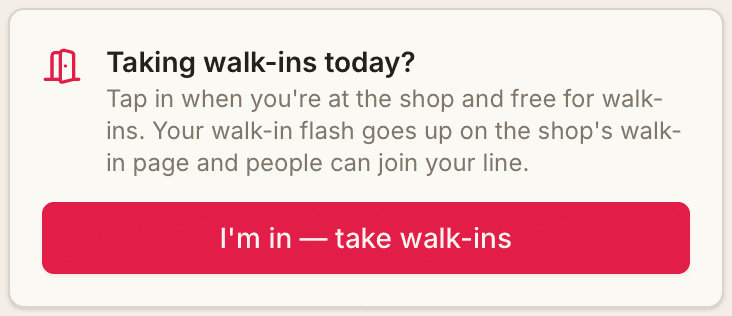
At the top of your dashboard, tap I'm in — take walk-ins when you're at the shop and free for them. Walk-ins are open while anyone's in, and it switches off by itself at the end of the day. Your dashboard then shows who's waiting for you, a tap from the line.

  • Only the artists who are in are offered to walk-ins, and the wait is worked out from them.
  • The owner, a manager or the front desk can tap anyone in or out from the Walk-ins tab, and pause walk-ins for the rest of the day.
  • With alerts on, your phone pops up when someone joins your line.

Find it: Dashboard · Appointments → Walk-ins

See walk-ins in full
Taking walk-ins today? with an I'm in — take walk-ins button
Everyone

One walk-in link, every day

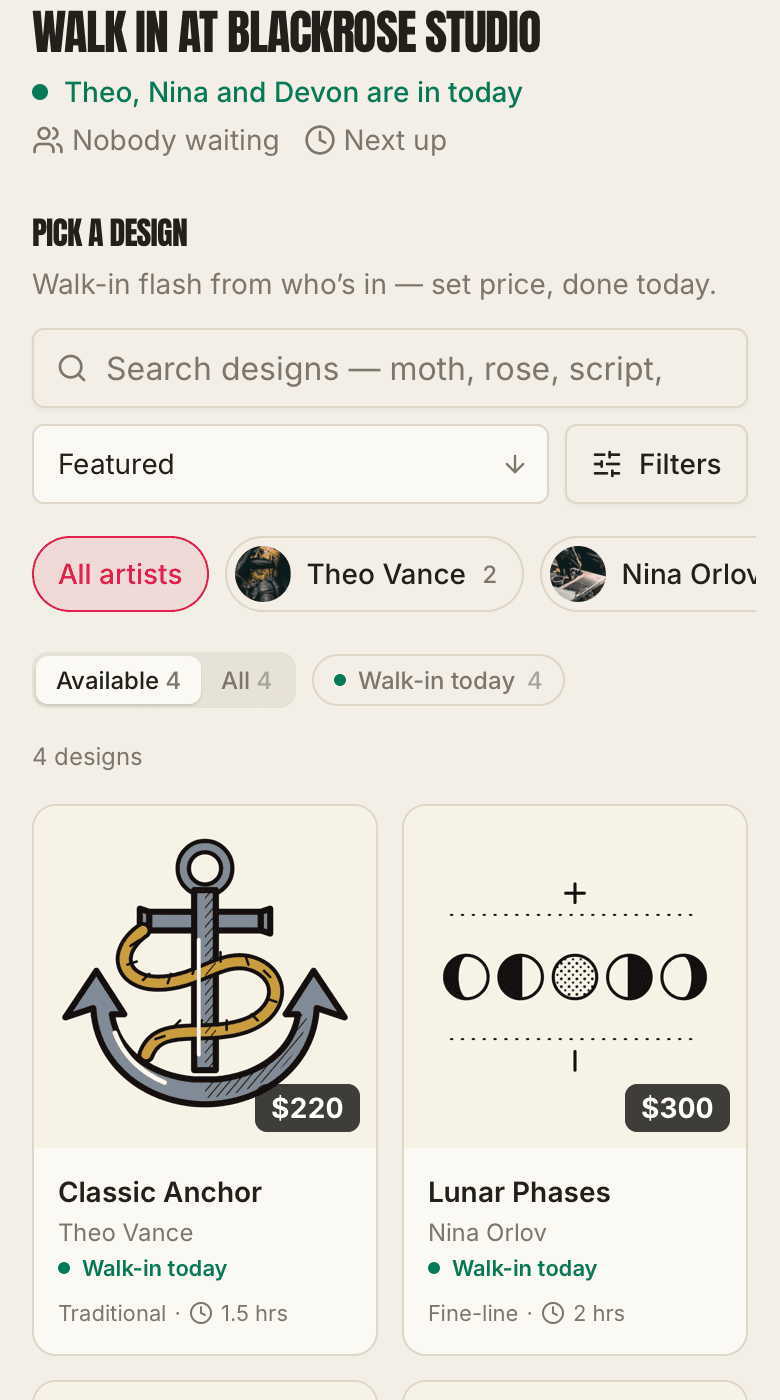
Your walk-in link and QR now work as a standing link for your bio and your window. When someone's in it names them and the wait, and people pick a design in the same flash shop as your flash page (search, filters, sorting and a closer look), then join that artist's line. When nobody is, it shows your walk-in flash to book for another day.

Find it: Appointments → Walk-ins → Walk-in code, or Storefront → Share

The walk-in page: who's in today, then the flash shop with search, filters and Walk-in today designs
Everyone

Walk-in today, in your flash shop

While an artist is in, their walk-in flash is tagged Walk-in today in your flash shop, with a filter for just those, so a client can see what they could walk in and get right now.

Find it: Your flash shop

October 28, 2026

Finishing a session, spelled out, and alerts you can find

The Sessions list on a request now says what each button does, and finishing a session there works the same as Done on your day. Plus a one-tap way to turn on alerts.

ArtistsOwners

Sessions say what they do

Each session on a request shows when it is (or that it isn't on the calendar yet), with labelled Date, Start time and Length boxes. The icons are gone: there's one big Mark session done button, then Mark as touch-up, No-show, Cancel session and Delete in words.

Find it: Any request → Sessions

ArtistsOwners

Turn on alerts from your dashboard

A card on your dashboard turns on pop-up alerts on that phone or computer for new requests, client messages and team notes, plus your day each morning. On an iPhone, alerts work once InkedFlow is on your home screen, and the home screen card now says so.

Find it: Dashboard

Also improved

  • On a studio that takes payments on Square, the client's payment screen says "Secure payment via Square".
October 26, 2026

A morning email only when there's something to do

A quieter morning brief.

Also improved

  • The morning email goes out only when there's something for you: sessions today, requests waiting over a day, or clients waiting on a reply. Artists now see their own waiting requests and messages in it too.
October 25, 2026

Square disputes on the request

For studios that take payments on Square.

Also improved

  • Disputes on Square payments now show up on the request.
October 24, 2026

Who to reach out to today, client groups, and every client's whole story

The client book now tells you who to reach out to and why, keeps the groups of clients you care about, files every lead by how the last call went, and shows everything about a client in one place. Plus a Schedule of who's in when, run your studio's way. Plus pull to refresh on the home-screen app, and more in Activity.

Owners

Who to reach out to today

The top of the Clients page now shows who to reach out to today, and why. It's worked out from what's already in InkedFlow, so nobody has to keep a list.

Find it: Clients

Owners

Client groups

Save the groups of clients that matter to your studio: your big spenders, your regulars, everyone you haven't seen in a year, cover-ups, quotes that never booked. Set it up once and it fills itself, so the right people are always one tap away.

Find it: Clients → Save a group

OwnersArtists

A client's whole history

Every client's page now has one History: requests, quotes, deposits, sessions coming up, payments, reviews, calls and notes, and the campaigns they were sent. Pin a note to keep it at the top.

Find it: Clients → any client

Owners

Call categories

Sort your leads by what happened on the call. Make your own categories, like Wants a quote, Call back later or Not interested, and see who's in each one on its own page, ready to call.

Find it: Clients → Categories

Owners

A Called button

Tap Called on any client to record the call. Pick what happened and they're filed under it, and they drop to the bottom of the list, so whoever's next to call is always on top.

Find it: Clients

Owners

Sort and filter your clients

Sort the client list by who to call next, biggest spenders, not seen longest, name and more, and narrow it down by category or artist. Start calling goes through exactly what's showing.

Find it: Clients

OwnersArtists

Schedule: who's in when

A new Schedule page shows every artist's hours for the week, with their extra days and time off. On a phone it shows one day at a time.

Find it: Schedule

Owners

Tags and contact preferences

Tag clients, note how they found you, and record what they asked you not to do. Someone who doesn't want calls is left off every calling list, and someone who doesn't want campaign emails never gets one.

Find it: Client page → Tags & preferences

ArtistsOwners

Pull down to refresh

Added InkedFlow to your home screen? Pull down at the top of any page to refresh it, the way you would in a browser.

Owners

More in Activity

Activity now shows the client book and more of the account: calls and texts logged on a client's page (how it went, never what was said), clients added or imported, merges, email campaigns sent, sessions booked, refunds and booth rent paid. All with who did it.

Find it: Activity

ArtistsOwners

Know when there's an update

When we release something new, a small “A new version is ready” note appears at the top. Tap Update and you have it, with no closing and reopening the app.

October 23, 2026

A page for every client, with a call log

Every client now has their own page to call them from and keep notes on, including everyone you've imported from another system. A calling list takes you through them one by one, and the same person shows in your book once.

Owners

Every client has a page

Tap anyone on the Clients page to open their page: Call, Text and Email buttons, where they stand and when to follow up, their requests, and what came over from your old system. Clients you've imported, from Square, Vagaro, a spreadsheet or any other list, have one too, even if they've never booked here.

Find it: Clients, tap a client

Owners

A call log for the whole team

After a call, tap how it went (talked, no answer, left a voicemail, texted), add a line if there's more to say, and log it. Everyone on the desk sees who called and when. A missed call offers a day to try again.

Find it: On a client's page

Owners

Work through a calling list

Filter your clients, say to everyone not contacted yet, and tap Start calling. You go from one client to the next, never-called first, logging each call as you go. When you come back from a call, the page asks how it went. Every client on the list now shows when they were last contacted.

Find it: Clients, Start calling

Owners

One person, one page

An imported contact with just a phone number now joins the client who booked with that number, so their old history and their bookings are in one place. When two entries might be the same person, like the same name with a second email, the client's page asks, and Merge puts them together. Changed your mind? Separate splits them again.

Find it: On a client's page

Owners

Add a client by hand

Put in someone from a paper card or a phone call with just a name and a number or email, and fix anyone's details with Edit on their page.

Find it: Clients, Add client

Also improved

  • InkedFlow on your iPhone or iPad home screen keeps you signed in.
  • A flash request shows its set price on the artist's page.
October 22, 2026

Run the whole day from the phone at your station

Your sessions, waivers, balances and rebooking now live on one card, with fewer taps between a client walking in and the next one booked.

ArtistsOwners

Your day, on one card

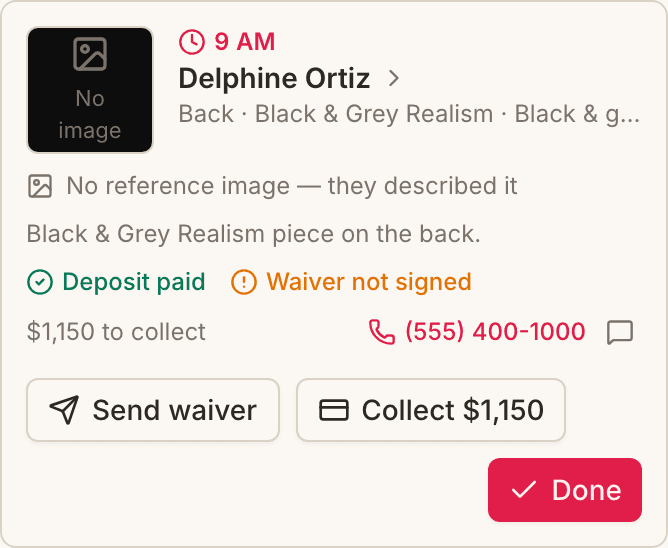
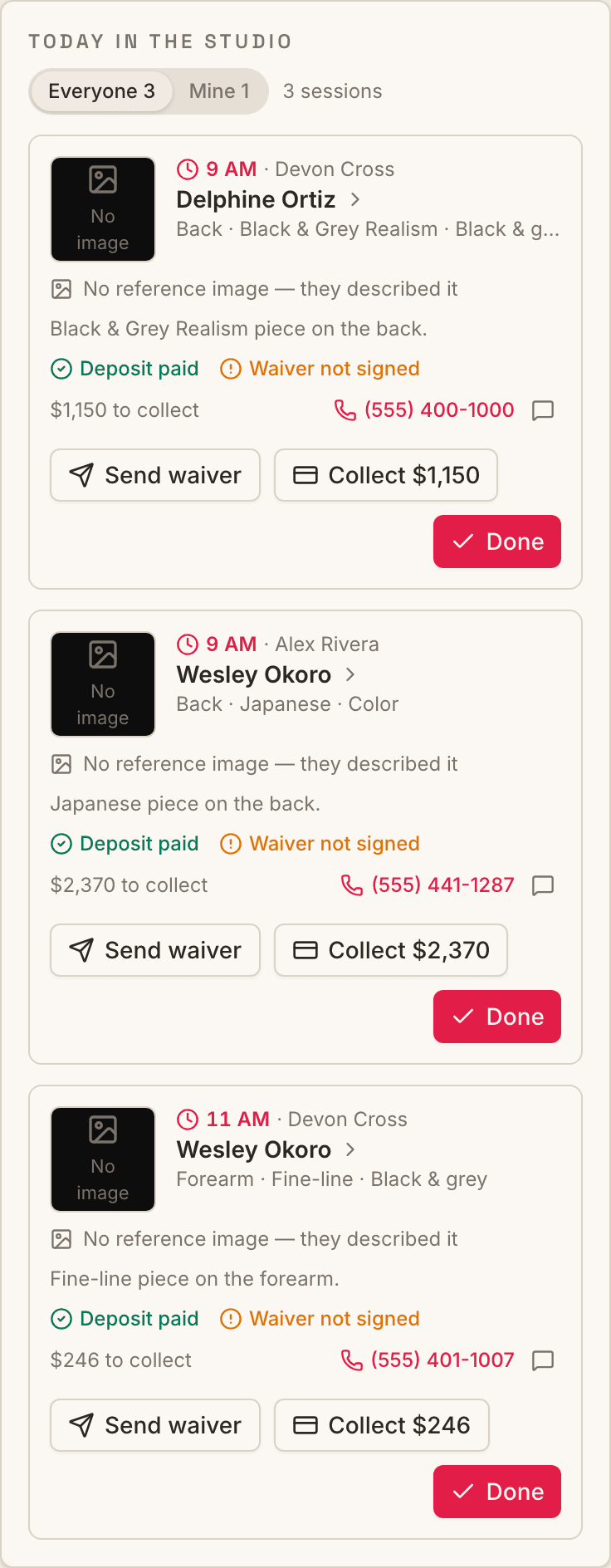
Open the app and today's sessions are laid out in order: the client, which sitting, placement and style, the design and every reference, deposit and waiver status, what's left to collect, and their number to tap and call.

  • Send waiver emails the client their signing link.
  • Collect opens the balance: payment link, terminal or cash.
  • Done finishes the sitting. On the last one the client gets their thank-you and tip & review email.

Find it: Top of your Overview

See the day view in full
A session on the day card with Send waiver, Collect and Done buttons
Owners

Today in the studio

Every artist's sessions for the day, each labelled with who's tattooing, with deposits, waivers and balances for the whole floor at a glance. If you tattoo too, switch to Mine.

Find it: Top of your Overview

Today in the studio, with an Everyone / Mine switch
ArtistsOwners

Rebook before they leave the chair

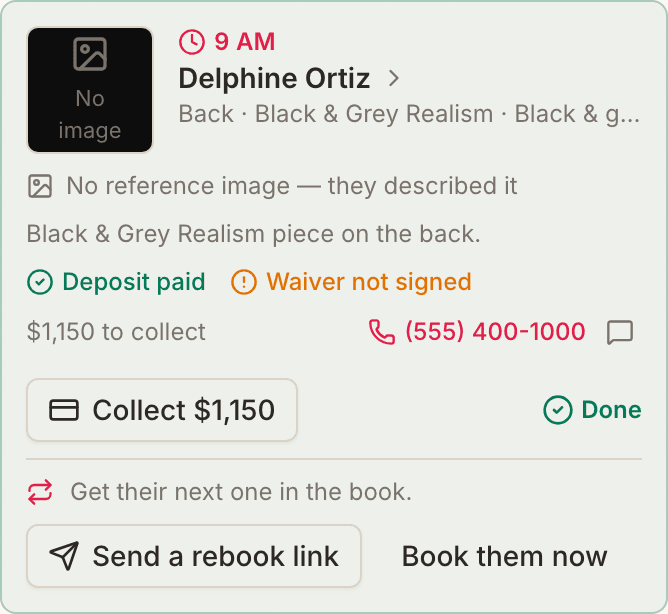
Mark a session done and the card asks what's next: book the next sitting of a multi-session piece, or send the client a link straight to your booking form.

A finished session offering Send a rebook link
Artists

Saved replies

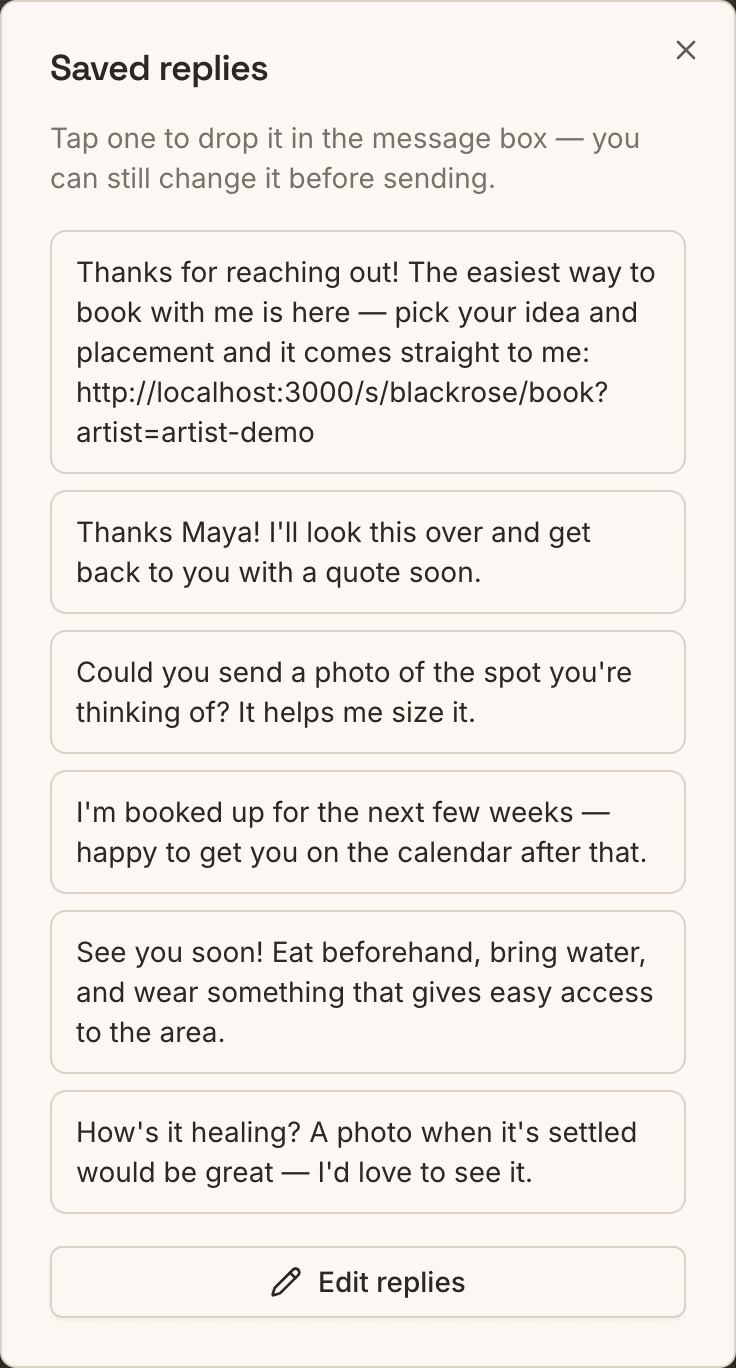
The messages you write twenty times a day, a tap away in every client chat. {client} fills in their first name and {link} your booking link. It starts with a few you can edit.

Find it: Any chat, the speech-bubble button

Saved replies with the client's name filled in
Artists

Answer “how do I book?” DMs in one paste

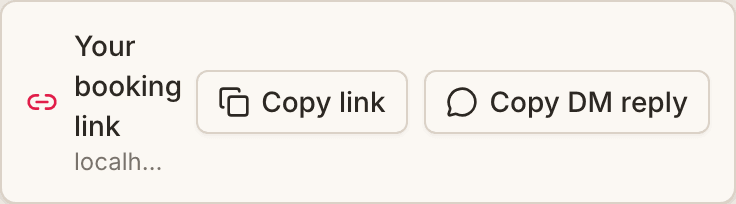
Your booking link and a ready reply sit at the top of your dashboard. Paste the reply into Instagram and the client lands on your form with you already picked.

Find it: Overview, Your booking link

Your booking link with Copy link and Copy DM reply buttons
ArtistsOwners

Quote in two taps

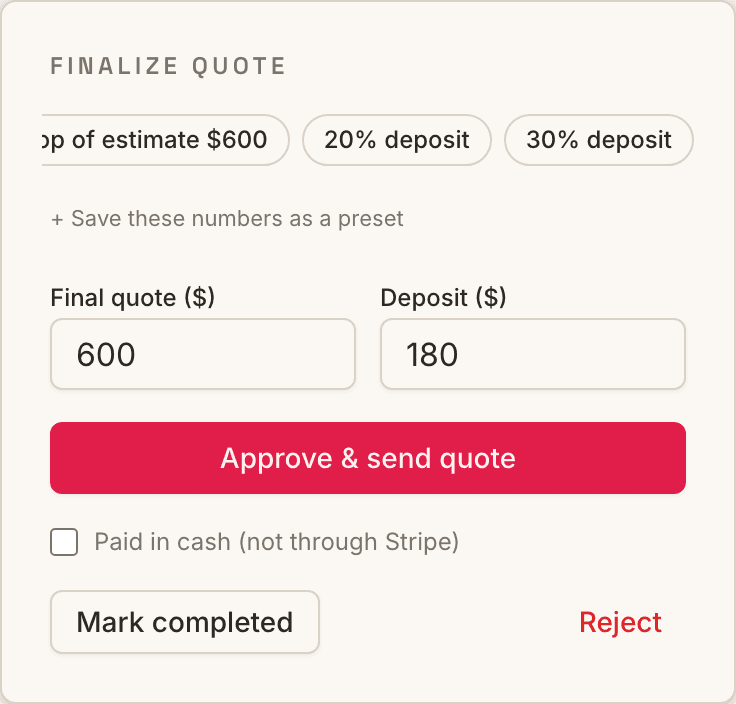
Fill the quote from the flash price or the estimate the client saw, then set a 20, 30 or 50% deposit. Save the numbers you use most as presets.

Find it: Any request, Finalize quote

Quote form with estimate, deposit and preset buttons
ArtistsOwners

Nudge a quote that's gone quiet

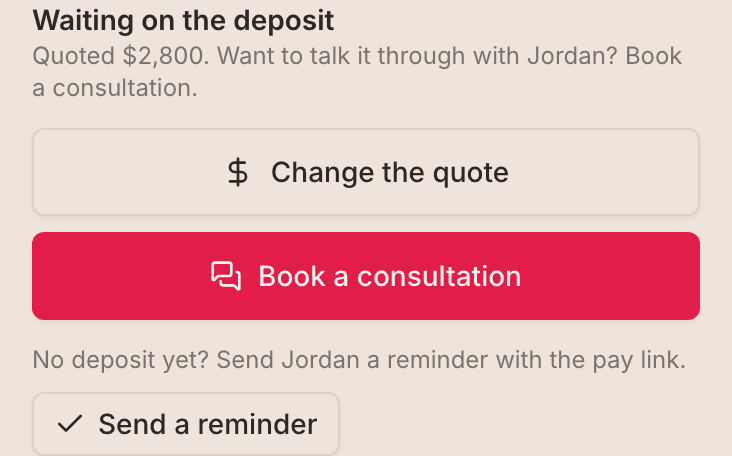
On a quote still waiting for its deposit, Send a reminder emails the client their pay link now, without waiting for the automatic reminder.

Waiting on the deposit, with a Send a reminder button
Everyone

Every request says how the design was picked

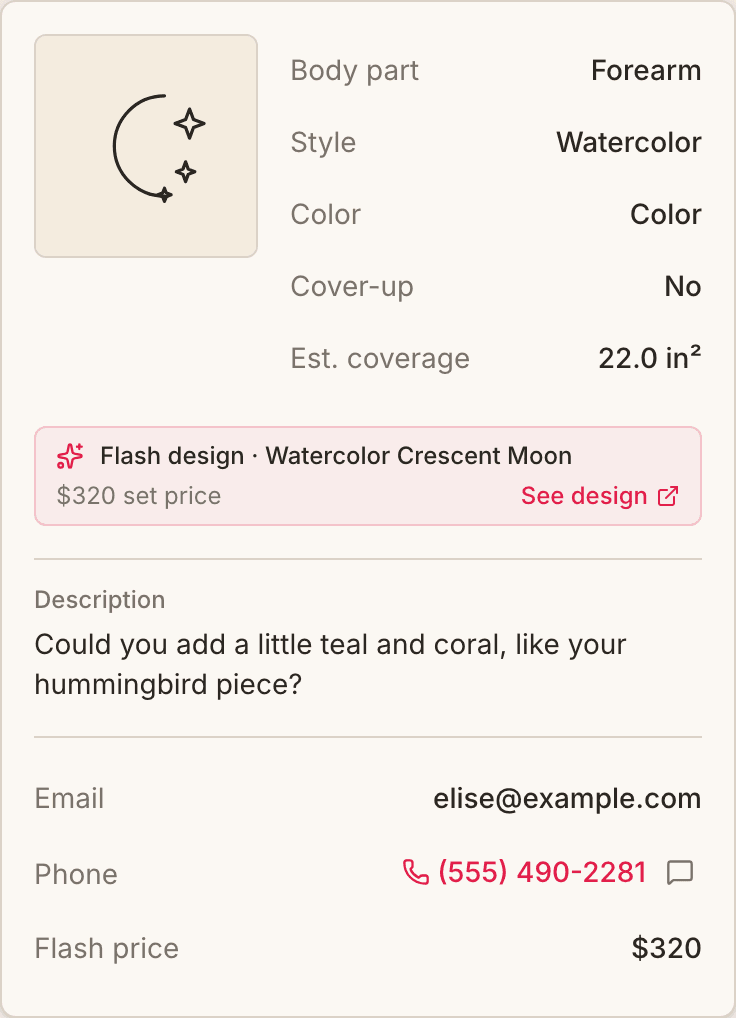
A flash booking shows the design, its title, set price and a link to it. Artist's choice says it's yours to draw.

A request showing a flash design with its title and set price
ArtistsOwners

A morning brief

An email and notification on days with something on: sessions, unsigned waivers and money to collect. Owners also see requests waiting over a day.

Artists

Your week, every Monday

What you earned (split, booth rate and tips, worked out like your payouts), anything waiting to pay out, and what's booked.

ArtistsClients

Healed photos for your portfolio

Clients are asked for one a few weeks after the session. If they say it can be shared, it goes on your page in one tap.

ArtistsOwners

Tap to call or text

Client numbers ring when tapped on requests, the walk-in board and the Clients list.

ArtistsOwners

Opens like an app

Add InkedFlow to your home screen when the dashboard offers. It opens straight to your day, still signed in.

OwnersClients

Your own prep notes

Write what clients should do before a session. It's emailed three days ahead, with a link to add it to their calendar.

Find it: Settings, Policies

Owners

A cleaner Overview

Repeated tiles are gone, and Coming up starts from tomorrow since today has its own card.

Also improved

  • iPhone photos (HEIC) now upload and show in every browser.
October 21, 2026

Stay signed in, and a smoother portfolio

Faster ways in, and a portfolio that browses like a camera roll.

ArtistsOwners

Straight to your dashboard

If you're already signed in, the login page and the home-screen app take you straight in, and your phone's password manager fills the form.

Owners

Choose who's on your shop page

Artists are listed automatically. Owners and managers show once they've added a style or some work, and a switch per person lists or hides anyone without affecting booking.

Find it: Storefront, Artists, Who's listed

Everyone

A portfolio that swipes like your camera roll

Pieces fade in as they load, swiping follows your finger, and the phone's Back button closes the photo instead of leaving the page.